
The quickest way to find lost earbuds is the finder service for your brand: Find My for AirPods, SmartThings Find for Galaxy Buds, and Google’s Find Hub for Pixel Buds and other supported earbuds. If yours aren’t listed there, or the map only says they’re somewhere at home, use a Bluetooth finder app. It lists nearby devices by signal strength, so you can walk toward the strongest reading.
Start with your earbuds’ own finder
- AirPods: open Find My, tap Devices and select your AirPods to see where they were last connected or to play a sound.
- Galaxy Buds: open SmartThings Find in the SmartThings app to see the last location and ring each earbud.
- Pixel Buds and other Find Hub earbuds: open Google’s Find Hub app, choose the earbuds and use Play sound.
Playing a sound needs the earbuds to have some charge and be in range of your phone. The map usually shows where they last connected, which can be the right house but the wrong room. That is where a live signal scan helps.
Find my earbuds with a Bluetooth scan
A Bluetooth finder app listens for the signals your earbuds broadcast while they have power. In Tracker Detect:
- Go to the last place you remember using them and turn Bluetooth on.
- Open Tracker Detect, switch to Find My Device and tap Start scan.
- Look for your earbuds in the results. Many appear under their product name, and the list puts the strongest signal first.
- Scan again from another room or corner. With Premium, continuous scanning keeps the list updating while you walk.
- When one device’s signal reaches Close, slow down and search by hand. With Premium, tap Locate to follow it in Live Locate.
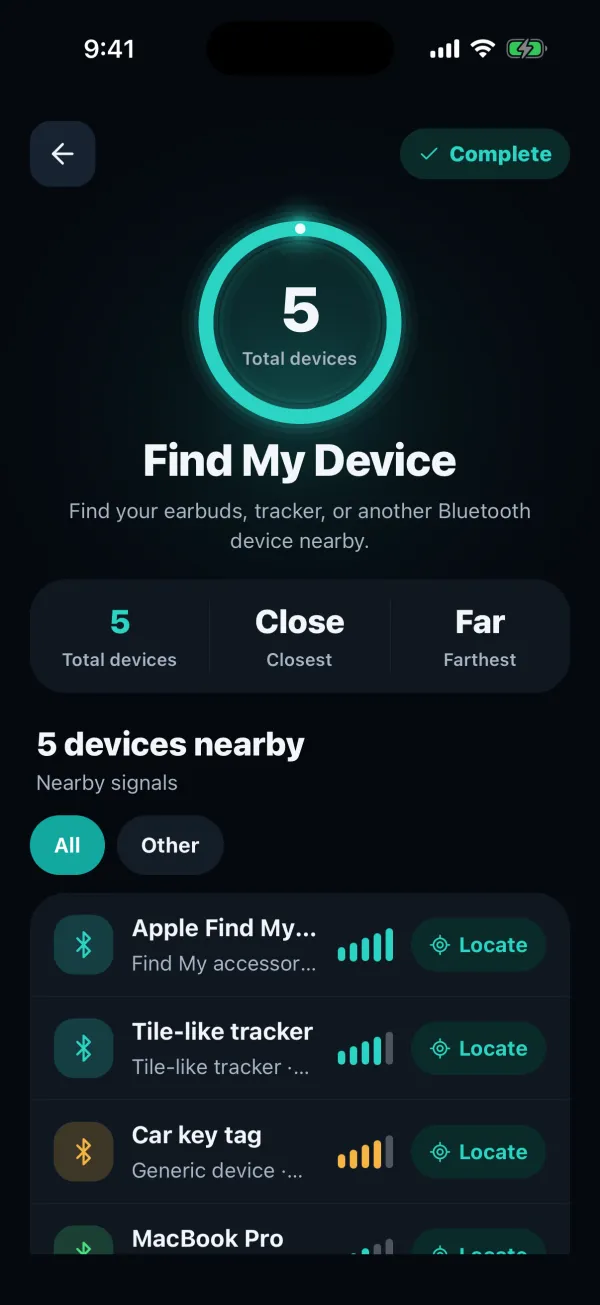
A free Find My Device scan lists nearby devices with some rows and details locked. Premium unlocks the full list with signal details, continuous scanning and Live Locate.
Why your earbuds might not show up
Earbuds only broadcast while they have power and are awake. These are the usual reasons a scan misses them:
- They’re in a closed case. Many earbuds stop broadcasting when the lid shuts.
- The battery is flat. With no power there is no signal, so start from the last place they were used.
- They’re connected to another device. Some earbuds advertise less while paired to a phone or laptop, so disconnect them from your other devices if you can.
- They’re out of range. Indoors, walls, furniture and your own body can shrink Bluetooth range to a room or two.
Where lost earbuds usually turn up
Earbuds are small and they roll, so think low and soft. Check between and under sofa cushions, in bedding and the gap beside the mattress, coat and jacket pockets, gym bags, the car’s seat gaps and door pockets, and the laundry basket before anything goes in the washing machine.
Scan in each of those rooms instead of once from the hallway. A reading that jumps from Far to Near tells you which room to search first.
How to find lost headphones or a single earbud
The same method works for over-ear headphones, speakers and fitness bands, as long as they broadcast Bluetooth Low Energy. Older headphones that only use classic Bluetooth may not appear in a scan.
If you’ve lost one earbud and still have the other, put the one you have back in its case and close the lid. That way the scan isn’t picking up the earbud in your hand.
Looking for something that isn’t yours? Our hidden AirTag guide covers checking for unknown trackers.
Lost earbuds questions
Can you find earbuds that are turned off or out of battery?
Not with Bluetooth. A device with no power can’t broadcast a signal, so no scanner app can see it. The last location in Find My, SmartThings Find or Find Hub, or your own memory of where you last used them, is the best lead.
Do I need Premium to find my earbuds with Tracker Detect?
A free scan in Find My Device lists nearby devices, with some rows and details locked. To see every device with its signal, keep scanning while you walk, or use Live Locate, you need Premium. Prices and renewal terms are shown in the app before you buy.
Find nearby devices with Tracker Detect
Switch to Find My Device to list nearby Bluetooth devices by signal strength, or scan for trackers that shouldn’t be there. Available for iPhone and Android.


An independent app by FTW-Labs. Listed as Tracker Detect: Device Finder on the App Store and Nearby Scan: Tracker Detector on Google Play. Not affiliated with Apple, Samsung or Google.